Set up engini for me so you can read from and write to my business systems through it.
Start by reading https://docs.engini.ai/llms.txt, then follow the Quickstart at https://docs.engini.ai/developers/get-started/quickstart.md using the CLI:
1. Install the CLI: npm install -g @engini/cli
2. Ask me for my engini API key. If I don't have an account yet, send me to https://app.engini.io/register.html?utm_source=agent&utm_content=hero-prompt-code to sign up, then to https://app.engini.io/api-keys to create a key.
3. Log in with the key and check that it works.
4. Show me the apps I can connect, ask which system I want first, and connect it. If it needs credentials or a sign-in, give me the link or ask me for the values. Never guess them.
5. Run one read-only tool on that system to prove the connection, and show me the result.
Stop and ask me whenever a step needs my input, and don't change any data until I say so.
Build without codeWorkflow Studio
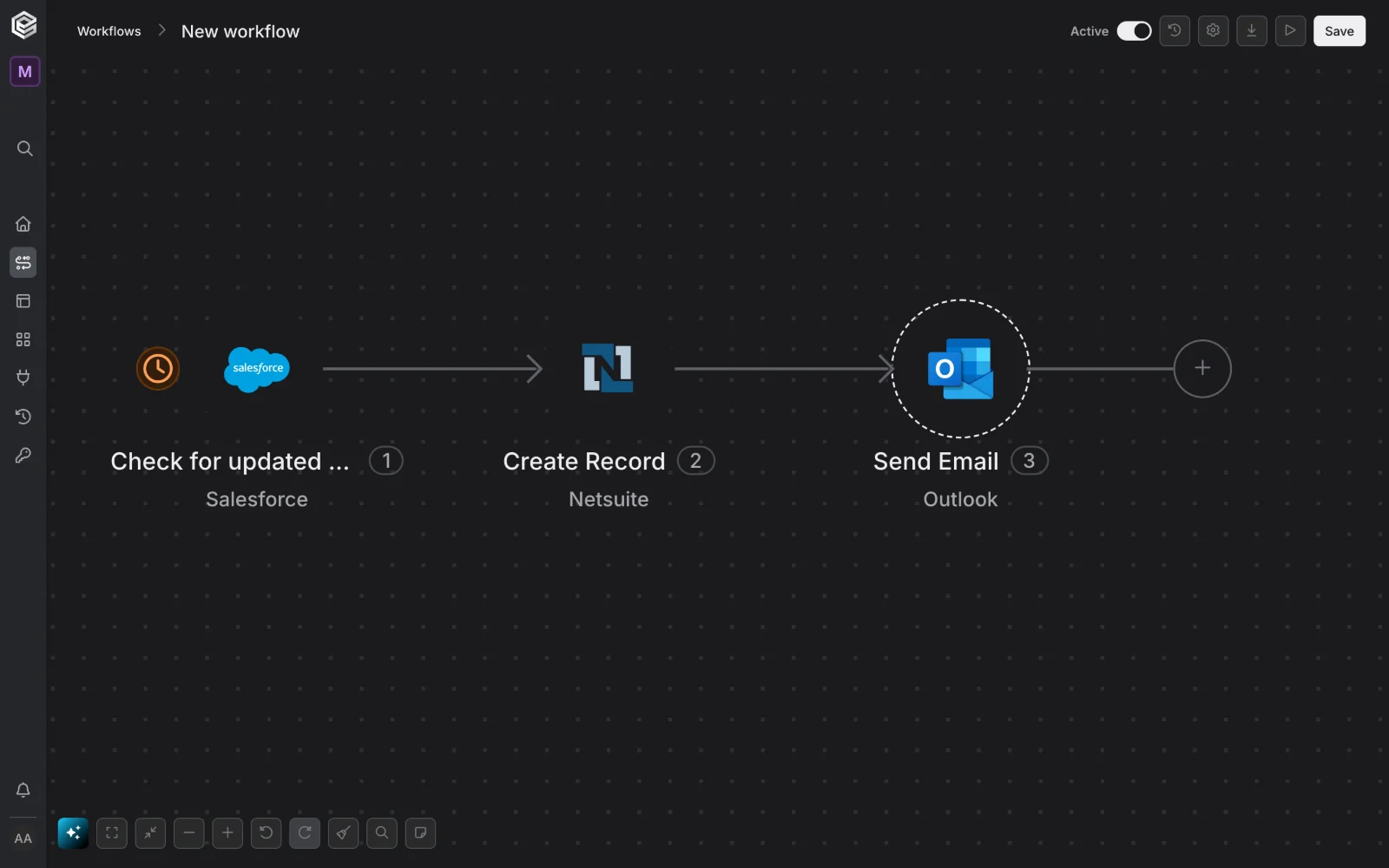
Connect to engini and help me build an automated workflow in Workflow Studio, engini's no-code builder.
Start by reading https://docs.engini.ai/llms.txt to find how to work with Workflow Studio from here. If I don't have an engini account yet, send me to https://app.engini.io/register.html?utm_source=agent&utm_content=hero-prompt-studio first.
Then:
1. Ask me what the workflow should do, what should start it, and which systems it uses.
2. Propose the steps before you build anything.
3. Build it with me, connecting each system as we go.
4. Test it once and show me what happened.
Stop and ask me whenever a step needs my input.
Customer logos rotate automatically. Press Space to pause or resume. Use arrow keys to browse. Motion stops while focused or hovered and follows your reduced-motion preference.
[ Why an agent gateway ]
Claude can write your integration. Then it breaks
Let engini handle the integration, so your team works on what matters: your agents.
Zero integration maintenance
Our team maintains every integration 24/7. API versions and schema work seamlessly, so nothing lands on your team. Never read integration documentation again.
From:
Salesforce
To:
you
Subject:
API version is being retired: action required
HANDLED BY
Security says yes, faster
Most agent projects stall at the security review. With engini, each agent gets only the tools you give it, and every call is logged and can stream to your SIEM.
SAP, NetSuite, Salesforce, Workday or your own database, exactly as you set them up. engini reads their live schema and custom objects, so your agent doesn't hit a wall.
For whoever builds with agents, and whoever keeps them safe
Write code or build on a canvas: your agents get the same connections either way. Security and IT set the rules for all of them.
Code Builders
Point your agent at engini
You build with Claude Code, Cursor or Codex. Your agent reads and writes NetSuite, SAP or Salesforce through a toolset, without you writing the integration.
You run the processes, not a development team. In Workflow Studio, agents work across your CRM, ERP, databases and support tools, including systems on your own servers.
Engini is a managed gateway that connects AI agents to the business systems your company runs on, such as SAP, Oracle, NetSuite, Salesforce and on-premises databases.
Your agents call Engini instead of calling each system directly. Engini serves each system's actions as ready-to-call tools, checks every call against the agent's toolset, injects the credential at execution and records the call in an audit trail. The same connections also power Agentic Workflows, a no-code canvas for building multi-step processes.
Who uses Engini?
Engini is built for mid-market and smaller enterprise organizations that want AI agents and automation to work inside complex business systems: ERP platforms, other systems of record, and legacy or on-premises environments.
These teams often have moderate or limited software-engineering capacity. Their finance, operations, IT and RevOps teams want agents that can read and update real records, but they cannot afford to build, secure and maintain a custom integration for every system and every agent.
Engini gives them governed connections they don't have to write or maintain, with the permissions and audit trail their security and compliance reviewers expect.
Why use a gateway instead of letting an AI agent write the integration?
Because an integration an agent writes is still code someone has to pay for, own, maintain and defend in a security review.
With Engini the agent calls tools that are already built from each system's live schema, so it doesn't spend tokens reading API documentation or writing integration code. Engini maintains the connectors when authentication, API versions, rate limits or schemas change. And every call runs inside permissions and an audit trail, so security and compliance teams can review what agents do.
How do I connect my AI agent to Engini?
Point any MCP client to https://mcp.engini.io and pass the toolset the agent should use in the X-Engini-Toolset header.
If you are building your own agent, the same tools are available through the SDK, the CLI and the REST API. The agent only sees the tools in its toolset, so you decide in Engini what each agent can do, independently of the model it runs on. Step-by-step guides are in the developer docs at docs.engini.ai.
Is Engini secure and compliant?
Yes. Engini has a SOC 2 Type II attestation report, ISO/IEC 27001 certification and is GDPR compliant.
Credentials are stored and refreshed by Engini and are never exposed to the model. Data is encrypted at rest and in transit, customer data is not used to train AI models, and users sign in through SSO with role-based access. Security reports and the Data Processing Agreement are available on request, and the security page describes each control in detail.
How do I start?
Sign up, connect one system and give an agent a toolset. Your first governed call can run in minutes.
If you would rather start with a conversation, book a demo or leave your details and the Engini team will walk through your systems, your security requirements and the first process you want agents to handle.
































 or your own agent