



[ Agent Gateway · Agentic Workflows ]

Ship agents into systems you can't afford to break.

The agent gateway for your enterprise systems. 70‑90% fewer AI tokens, zero code, zero maintenance and enterprise-grade security on every call.

Paste in your coding agentCopy

Set up Engini in my coding agent by following the steps in https://docs.engini.ai

Trusted by hundreds+
AdamaBrink'sH&MeToroAmanCloudShareFox GroupYango
[ Why an agent gateway ]

Your agent can write an integration. It shouldn't have to. You'd pay for the tokens, own the code, maintain it and defend it in every security review. Engini removes all four.

  1. 01 · Cost
    70‑90%

    fewer AI tokens

    Engini serves each system's tools ready to call. No tokens spent reading docs, mapping schemas or writing code.

  2. 02 · Build
    Zero

    lines of code

    Engini sits between your agents and your systems. Connect, pick a toolset, done.

  3. 03 · Run
    Zero

    maintenance

    Auth refresh, API versions, rate limits and schema changes are on us.

  4. 04 · Trust
    Enterprise‑ready

    security, compliance and audit

    Credentials never reach the model. Every call is scoped, logged and auditable.

    SOC 2 Type IIAICPA SOC for Service OrganizationsISO 27001 certifiedGDPR compliantHIPAA compliant

See it with your own systems. Connect one system and let your agent call it in minutes.

Agent gateway

Ship agents into systems you can’t afford to break

Agent gateway and workflow automation on one iPaaS core: MCP, SDK, API, or canvas, with secure auth, audit trail and tool permissions built in.

Where it works

Whatever the system, your agent acts inside it.

Most agent platforms stop where the public APIs stop. engini carries your agent safely down through every layer.

Day-to-day apps

Use OAuth or API keys and your agent is in. No integration exists? Configure a custom one easily.

Business systems of record

Your systems as you configured them, not as the vendor shipped them: engini reads each instance’s live schema, custom objects included, so your agent can dive into the ones everyone is afraid to touch.

Behind your firewall

No port opened, nothing exposed: install the On-Prem Agent inside your network and your agent reaches the databases, file drops and applications that were never meant to see the internet.

Trusted by

Security and compliance

  • GDPR compliant
  • ISO 27001 certified
  • AICPA SOC for Service Organizations
  • SOC 2 Type II
  • Software Advice Most Recommended 2026
  • Capterra Best Value 2026
  • Software Advice Best Customer Support 2026
01 / The agent gateway

Not another connector library. Engini sits between your agents and your systems of record and decides what each call may do.

A long terracotta wall with a single narrow opening; one small sage-green ball sits in the doorway.
Fig. 01 · One wall, one opening. Every call passes through the gateway, and only what is allowed gets through.Editorial illustration
Toolsets. Each agent sees only the tools you put in its set.
toolsetfulfilment-bot
salesOrder.read
fulfillment.create
invoice.get
customer.update
vendor.delete
Approvals. Route risky calls to a person, by amount, system or action.
approvalhold
netsuite.salesOrder.create
$61,200
rule · > $50,000 → finance
ApproveReject
Audit trail. Every call, its arguments and the person it acted for.
calls · 12ho2c
allowholddeny
Live schema. Reads your instance, custom fields included.
schemanetsuite
record SalesOrder
├ entity        ref
├ tranDate      date
├ custbody_region
└ item[]
  ├ quantity    float
  └ custcol_margin
On-Prem Agent. Reaches systems behind the firewall with outbound calls only.
networkoutbound only
Engini logoEngini cloud
firewall · no inbound ports
On-Prem Agent
02 / Any agent

Any agent. The same rules. Every tool call goes through Engini and gets one of three answers.

Works with
  • Claude logoClaude
  • OpenAI logoChatGPT
  • Gemini logoGemini
  • Cursor logoCursor
  • DeepSeek logoDeepSeek
  • Copilot logoCopilot
  • OpenClaw logoOpenClaw
  • Hermes logoHermes
  • +Your custom agent
  • One endpoint. Point any MCP client, SDK or script at Engini.
  • Keys stay in Engini. The model never sees a credential.
  • Same rules for every agent. Each call is allowed, held for approval or denied, and logged.
tool callnetsuite.invoice.get
Engini
AllowIn the toolsetinvoice.get
HoldNeeds approvalorder > $50k
DenyNot in the toolsetvendor.delete
03 / One real call

Watch one call. A procurement agent tries to change a purchase order in SAP. Here is what happens in the next few seconds.

  1. The agent asks09:41:02

    Your procurement agent, running on Claude, wants to raise purchase order 4500018231 in SAP from $38,000 to $64,500.

  2. Engini checks the toolset09:41:02

    Updating purchase orders is in this agent's toolset. The SAP credential stays in Engini, so the model never sees it.

  3. A rule holds the call09:41:02

    Changes over $50,000 need a finance approver. The call is held, not failed, and the agent is told exactly why.

  4. A person decides09:47:15

    The finance approver sees the exact change, old value and new value, and approves it in one click.

  5. SAP is updated. The trail is written.09:47:16

    Engini runs the call with its own scoped credential and records who asked, who approved and what changed.

Call receivedPO 4500018231
Tool call · Claude · procurement agentsap.purchaseOrder.update
po4500018231amount$38,000 → $64,500vendorNorthwind Supply
Toolset
✓sap.purchaseOrder.update is allowed for this agent
✓Credential injected by Engini, hidden from the model
Rule
●amount > $50,000 requires finance approval
Hold  agent told: waiting for approval
Approval
Finance approver · reviewed the changeRejectApprove
Result
Done  SAP updated in 1.2s
✓Audit record: agent, approver, before and after, timestamp
The agent

Did the work. No integration code written.

Finance

Kept control of the one change that mattered.

Security

Got a complete trail, with no keys in the model.

03 / How it works

Connect once. Govern everything after. One connection serves your agents, workflows and apps.

01

Connect a system

OAuth, keys or on-prem

Sign in once. Engini stores and refreshes the credentials, then reads the live schema of that instance, custom records included.

Two textured paper discs, sage and terracotta, cut so their wavy edges fit together into one circle.
acme / connections / new
Connect NetSuiteChoose how Engini authenticates.
OAOAuth 2.0acme-prod · 4 custom records foundconnected
TBToken-based authconsumer key + tokenUse
OPOn-Prem Agentoutbound only, no open portsInstall
02

Scope a toolset

least privilege by default

Pick the tools an agent may call. Reads can run on their own, writes can wait for a person, everything else stays invisible.

A brushed metal tray with fitted slots holding matched pieces, one slot empty and a loose copper disc left outside. The tray carries a NetSuite engraving.
toolsets / fulfilment-bot
fulfilment-bot12 tools · used by 2 agents
netsuite.salesOrder.readread
netsuite.fulfillment.createwrite
netsuite.salesOrder.createwrite · approval > $50k
netsuite.vendor.deleteblocked
03

Call it from anywhere

MCP, SDK, CLI or REST

The same toolset answers an MCP client, a script or a workflow step. Your agent code stays small.

Fine white lines weave across a dark, grainy background and merge into a single bundle, with three small colored nodes along the way.
code studio · sdk
Run a toolRan on its own · creates a fulfilment
engini.tools.run(
    "netsuite.fulfillment.create",
    toolset="fulfilment-bot",
    order=order.id,
)

→ resolving toolset fulfilment-bot
✓ fulfilment 8821 created · audit 9f2c
04

Approve what matters

a person in the loop

Calls over a threshold pause and go to the right person. The agent continues once they decide.

A hand pulls the lever of an old hand press over an open ledger, with a brass desk bell and blue paper tickets on the desk.
approvals / pending
netsuite.salesOrder.createo2c-agent on behalf of dana@acme.com
$61,200 · ACME-0042rule: amount > $50,000 → finance
12 × PX-200ship Monday · EU warehouseRejectApprove
05

Audit every call

one log for every agent

Each call gets an audit id with the agent, the person, the arguments and the decision, in one place you can search.

A translucent envelope showing a blue card next to a sealed dark envelope, in front of a wall of numbered lockers.
audit / today
Audit logo2c-agent · last 5 calls
allownetsuite.fulfillment.create9f2c · 462ms
netsuite.salesOrder.create9f2b · awaiting finance
denypriority.customer.delete9f2a · not in toolset
allowsap.purchaseOrder.get9f29 · 88ms
04 / Systems of record

Deep where agents usually can't go. 1,500+ integrations, with real depth in the ERPs that run the business.

Two office buildings carrying Salesforce and SAP signage, joined by a glass skybridge with one person crossing.
Fig. 04 · Conceptual architecture, not real company offices.
Systems of record,not just SaaS apps

Live schema · custom objects · on-prem reach

Engini reads each instance's live schema, so an agent working in SAP or NetSuite sees your records and custom fields, not a generic template.

  • ERPSAP logoSAP
  • ERPNetSuite logoNetSuite
  • ERPOracle logoOracle
  • ERPMicrosoft Dynamics 365 logoDynamics 365
  • HCMWorkday logoWorkday
  • ERPInfor logoInfor
  • ERPSage logoSage
  • ERPXero logoXero
  • ERPOdoo logoOdoo
  • ERPIBM logoIBM AS/400
  • CRMSalesforce logoSalesforce
  • ITSMServiceNow logoServiceNow
  • CRMHubSpot logoHubSpot
  • SupportZendesk logoZendesk
  • CommerceShopify logoShopify
  • DatabasePostgreSQL logoPostgreSQL
  • DataSnowflake logoSnowflake
  • ChatSlack logoSlack
  • WorkJira logoJira
  • Workmonday.com logoMonday.com
  • 1,500+

    integrations, with OAuth, API keys or the On-Prem Agent for what lives behind the firewall.

    View all integrations →
05 / The platform

More than a gateway. When the agent's work needs a process, a record or a person, it's already here.

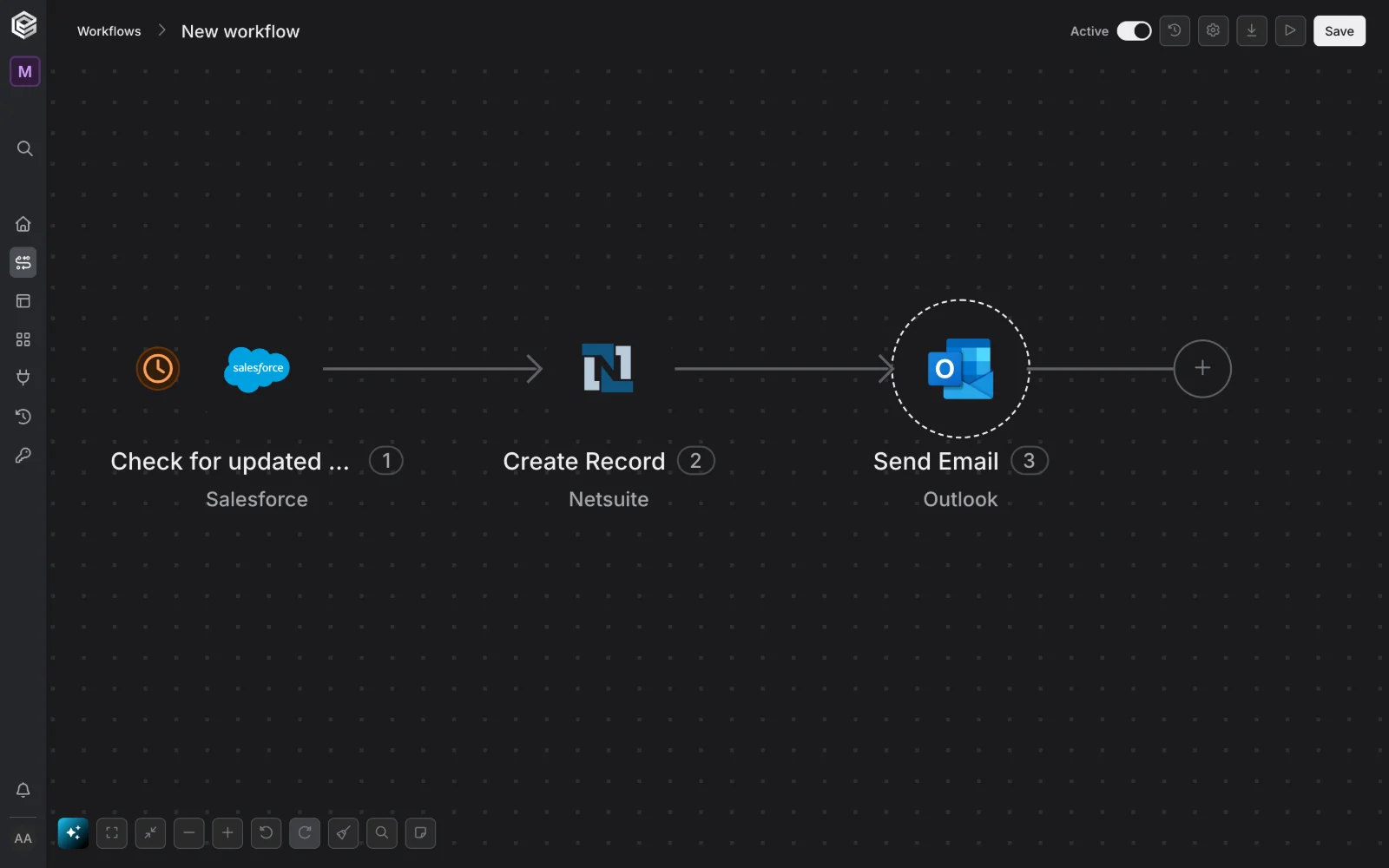
Agentic Workflows Multi-step automation where agent steps sit next to branches, retries and approvals.
Explore workflows →

Tables Shared records your agents and workflows read and write, with the history kept on every row.
Explore tables →

Apps Internal tools and approval screens on top of your systems, without a front-end project.
Explore apps →

Agent library Ready-made agents for O2C, P2P, support and HR that you configure instead of code.
Explore the agent library →

06 / Security

Built for the team that signs off. Audited, certified and ready for your security review.

SOC 2 Type II
SOC 2 Type II
AICPA SOC for Service Organizations
AICPA SOC
ISO 27001 certified
ISO 27001
GDPR compliant
GDPR
HIPAA compliant
HIPAA
Recognized byCapterra Best Value 2026Software Advice Most Recommended 2026Software Advice Best Customer Support 2026
  • Credentials stay with Engini. OAuth tokens and API keys are stored and refreshed by the gateway and never exposed to the model.
  • Every call is logged. Agent, person, arguments and decision, searchable and exportable for audits.
  • Least privilege by default. Toolsets and approvals decide what each agent can do.
08 / Questions

Straight answers. For people and for the agents reading this page.

Why use Engini instead of letting my AI agent write the integration?

Four reasons. First, Engini serves each system's tools to the agent ready to call, which cuts AI token usage by 70‑90% compared with an agent reading docs and writing integration code. Second, there is no code to write: Engini sits between your agents and your systems of record. Third, there is nothing to maintain: auth refresh, API versions, rate limits and schema changes are handled by Engini. Fourth, every call gets enterprise-grade security, compliance, logging and audit (SOC 2 Type II, ISO 27001, GDPR).

What is Engini?

Engini is an agent gateway and agentic workflow platform built on one iPaaS core. It connects AI agents such as Claude, Codex and Cursor to business systems of record such as SAP, NetSuite, Oracle, ServiceNow and Salesforce, with authentication, scoped toolsets, tool permissions and an audit trail on every call.

What is the difference between the Agent Gateway and Agentic Workflows?

The Agent Gateway is the code path: agents and developers call Engini tools over MCP, SDK, CLI or REST API. Agentic Workflows are the no-code path: you build multi-step automations with AI agent steps on a visual canvas. Both use the same connectors, credentials, toolsets and audit trail.

How do I connect my AI agent to Engini?

Point any MCP client to https://mcp.engini.io and pass the toolset you want the agent to use in the X-Engini-Toolset header. You can also call the same tools from the SDK, the CLI or the REST API. The agent only sees the tools inside its toolset.

Which systems does Engini integrate with?

Engini has more than 1,500 integrations, from day-to-day apps such as Slack, Gmail and Google Sheets to systems of record such as SAP, NetSuite, Oracle, ServiceNow, Salesforce and Workday. Engini reads each instance's live schema, including custom objects and fields. If an integration does not exist, you can configure a custom one.

Can Engini reach systems behind a firewall?

Yes. The Engini On-Prem Agent runs inside your network and makes outbound calls only, so no inbound ports are opened. Agents can then reach on-premise databases, SFTP file drops and internal applications.

Is Engini secure and compliant?

Engini is SOC 2 Type II attested, ISO 27001 certified and GDPR compliant. Credentials are stored and refreshed by Engini and are never exposed to the model. Every tool call is authenticated, checked against the agent's toolset and written to the audit trail.

How do I start?

Engini is free to start. Sign up at engini.ai, connect your first system, define a toolset or build a workflow, and point your agent at Engini. You can also talk to the team for an enterprise rollout.

Who uses Engini?

Teams at Adama, Brink's, H&M, eToro, Aman, CloudShare, Fox Group and Yango use Engini.

[ Start building ]

Give your agent the tools. Keep the keys.

Connect a system, define a toolset or build a workflow, and point your agent at Engini. Free to start.

MCPhttps://mcp.engini.ioCopy
Talk to a person

Rather start with a conversation?

Leave your details and someone from the Engini team will get back to you about your systems and use case.

This is some text inside of a div block.